FileClarity organizes local documents with on-device AI and privacy
Organizes local documents, extracts searchable text from PDFs and suggests file names using on-device AI, all without uploading files. FileClarity, from Onsimdang AI Company, targets professionals and students who store many documents on Android devices. Key capabilities include full-text search across PDFs and Office formats, SHA-256 duplicate detection, and on-device OCR. The app suits mobile users who need private, local document indexing and basic category management for cleaner folder structures.
How the app handles local document discovery and indexing
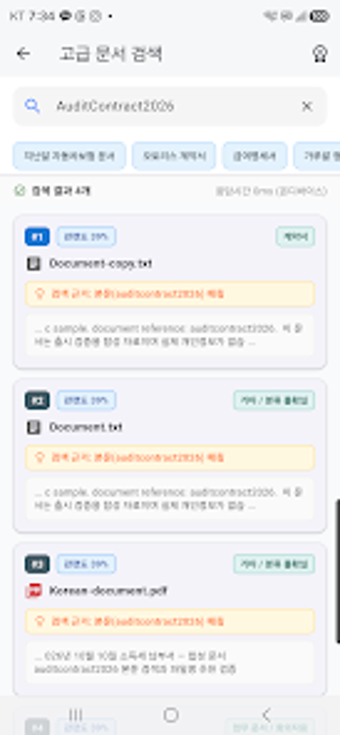
FileClarity builds an on-device index for Downloads, Documents, and user-selected folders so searches run locally. The app supports content extraction for PDF, DOCX, XLSX, PPTX, and TXT files, enabling full-text queries rather than name-only lookups. Indexing runs without cloud transfer, which the developer implements to keep extracted text and file metadata entirely on the device.
How it improves file hygiene and duplicate management
Duplicate detection uses hash-based checks instead of filename comparison, applying SHA-256 checksums to identify identical files. The tool surfaces duplicate candidates and requires explicit user confirmation before deletion, which preserves user control. Rule-driven name suggestions derive from document content to standardize naming conventions and help reduce long-term folder clutter.
How it fits real workflows and its operational limits
Designed for offline workflows on mobile devices, the app performs OCR for scanned PDFs via the Google ML Kit SDK and classifies documents by content for manual or basic category management. Full folder scanning needs Android 11 or later for all scanning features, which affects users on older devices. Advanced features are gated behind a Lifetime Pro access tier, and the interface emphasizes focused utilities over broad collaboration tools.
Who should deploy FileClarity in their mobile workflows
FileClarity is a privacy-first choice for professionals and students who handle many local documents and need accurate, on-device search and duplicate detection. It favors users who accept a more utility-focused interface and limited collaboration features; mobile teams that require cloud-based sharing or real-time sync should consider other tools. For single-device document clean-up and private indexing, FileClarity performs the specific job it targets.